Schluter
schluter
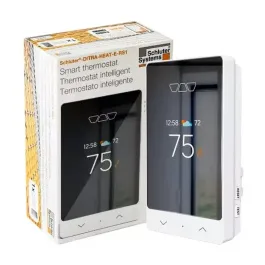
The Schluter integration allows you to integrate your Schluter-DITRA-HEAT-E-WiFi electric floor heating thermostat in Home Assistant.
In Apple Home through HomeKit Bridge
What HomeKit Bridge makes of each kind of entity this integration creates, read from its source code. A device only gets the ones that apply to it.
| Entity | Shows up as | Note |
|---|---|---|
climate | Thermostat |
What people report
Schluter DITRA-HEAT cloud login fails for newer RS1 and many accounts; HomeKit workaround used.
- Not working1
- Won’t be supported1
| Device | In Home Assistant | In Apple Home | What they said | Source |
|---|---|---|---|---|
| Schluter DITRA-HEAT thermostat | Not working Cloud | Invalid email / bad credentials errors; no fixSaved copyI believe this is what I used to get this to work again: https://github.com/VoRCeK/py-schluter { "version": "0.2.0", "domain": "schluter", "name": "Schluter", "codeowners": ["@prairieapps"], "documentation": "https://www.home-assistant.io/integrations/schluter", "iot_class": "cloud_polling", "loggers": ["schluter"], "quality_scale": "legacy", "requirements": ["py-schluter @ git+https://github.com/VoRCeK/py-schluter.git@master"] } Excerpt saved from GitHub on 2026-10-23. | Issue #127241 · 2024-10 | |
| Schluter DITRA-HEAT-E-RS1 | Won’t be supported Cloud | Login fails; user paired it via HomeKit Controller insteadSaved copyThe problem Getting below errors when attempting to login to the account I created for the new Schluter RS1 Smart Thermostat: https://www.schluter.com/schluter-us/en_US/Floor-Warming/Schluter%C2%AE-DITRA-HEAT-E-RS1/p/DITRA_HEAT-E-RS1 One thing of note this new smart thermostat did require a different app from the app store on my phone. I wonder if there are different APIs? Log file entries: `Logger: schluter.authenticator Source: components/schluter/init.py:44 First occurred: 11:31:21 AM (1 occurrences) Last logged: 11:31:21 AM Token has expired. Logger: homeassistant.components.schluter … Excerpt saved from GitHub on 2026-10-23. | Issue #92995 · 2023-05 |
Gathered from GitHub issues, pull requests, discussions and docs, and from r/homeassistant. These are individual reports, so check the linked thread and the date before you buy.
How it connects
Cloud polling
Goes through the maker’s cloud, asking it for updates every so often. Needs the internet and an account.
Details
| Installs (analytics) | 188 (0.03%) |
|---|---|
| Quality scale | Legacy |
| Added in | Home Assistant 0.108 |
| Set up in the UI | No, YAML |
| Maintainers | @prairieapps |
In ReReHome
Whatever HomeKit Bridge shares reaches Apple Home as normal HomeKit accessories behind your Home Assistant bridge, so ReReHome shows and controls them like any other.
Bridges get their own settings page listing the accessories behind them.